

Table of Contents
Freight Billing Automation: How Warehouse and Logistics Managers Are Eliminating Manual Data Entry and Billing Errors

Warehouse Automation Specialist, Quinta
Published Date: October 12, 2026
Where does an error in freight billing start?
When is an invoice generated?
No, it begins much earlier.
When shipment details are measured, recorded, transferred, or entered into the wrong system.
A parcel is weighed manually.
The dimensions are entered into a spreadsheet.
When the wrong shipment barcode is scanned.
A shipment record is updated later.
The billing team then uses this information to calculate the freight charge.
By the time the error appears on an invoice, the original mistake is probably several steps away.
This is why more warehouse and logistics managers are evaluating a freight billing automation system.
A freight billing automation system helps connect physical shipment data with the digital systems used to calculate and process freight charges.
For warehouse and logistics managers, the objective is not simply to generate invoices faster. It is to create a more reliable connection between what happened to a shipment and the charge eventually recorded against it.
This guide explains where freight billing errors originate, how automation works, where Dimensioning, Weighing and Scanning (DWS) systems fit into the process, and what to evaluate before investing in a solution.
Things Discussed in This Blog
- Why manual freight billing creates data-quality problems?
- How a freight billing automation system connects shipment capture, processing and billing?
- How DWS systems capture dimensions, weight and shipment identification?
- Why volumetric weight and accurate parcel dimensions matter?
- How to evaluate integration, exception handling, throughput and auditability?
- When a warehouse should consider automating its freight billing workflow?
Why Freight Billing Errors Are Often a Data Problem?
A freight billing error can originate when shipment information is captured incorrectly, associated with the wrong shipment, transferred incompletely or processed using an incorrect billing rule.
Freight calculations may depend on several inputs:
- Shipment identification or barcode.
- Actual shipment weight.
- Parcel dimensions.
- Dimensional or volumetric weight, where applicable.
- Origin, destination and service type.
- Customer account and applicable contract.
- Carrier rates, surcharges and billing rules.
If a required input is incorrect, the resulting freight charge may also be incorrect.
According to the National Institute of Standards and Technology (NIST), inaccurate measurement data can significantly affect downstream business processes and transaction accuracy.
The problem becomes more difficult to control when these details are collected through separate processes.
Consider a 3PL warehouse processing over 8,000 parcels each day. If parcel dimensions or weight are entered manually into multiple systems, even a small data entry mistake can result in incorrect freight charges or billing disputes.
By capturing shipment dimensions, weight, and barcode data automatically at the warehouse floor, the billing process becomes more accurate and significantly reduces manual intervention.
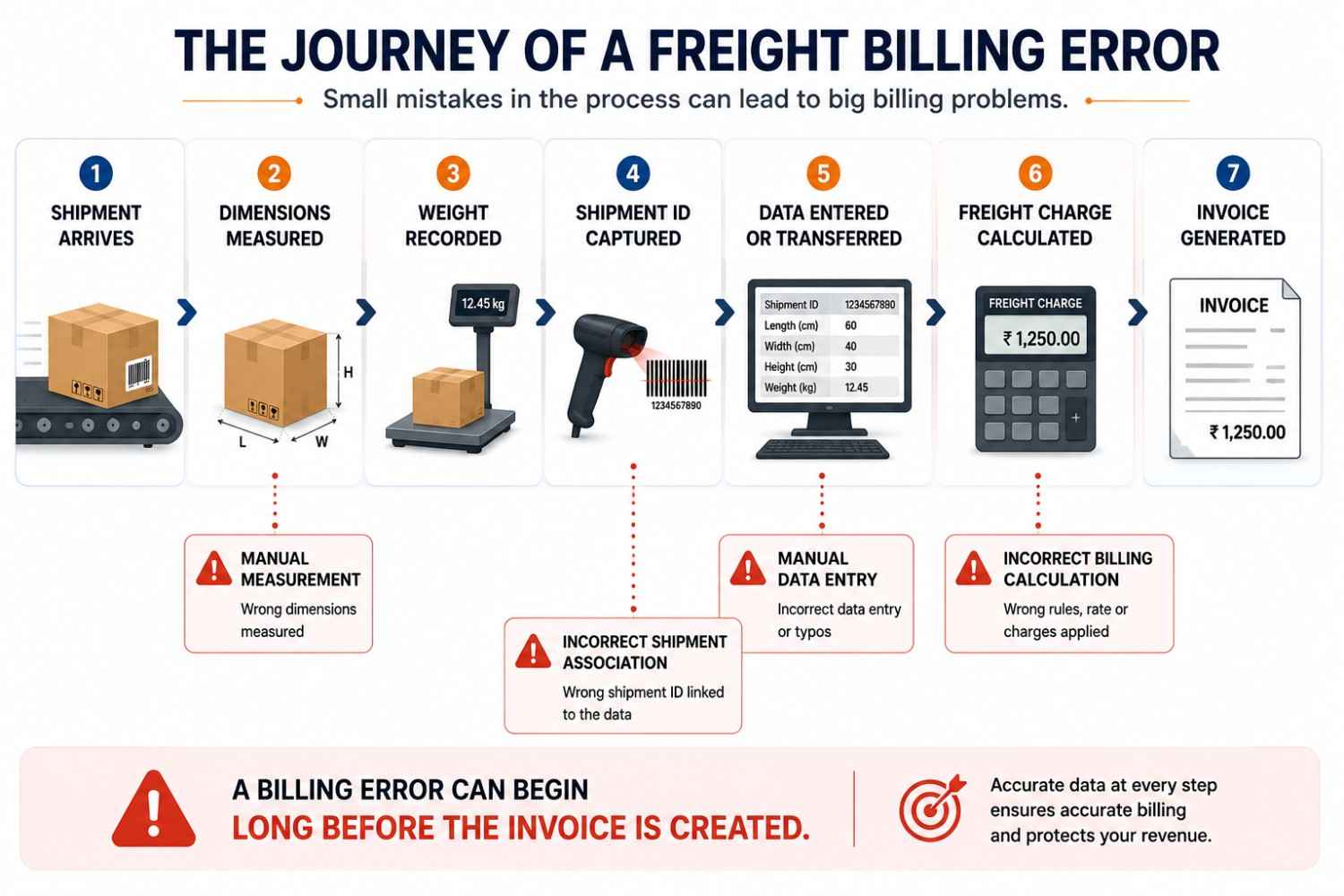
How a Freight Billing Error Travels Through a Warehouse
Consider a shipment that passes through the following workflow:
- A parcel arrives at the measurement station.
- An operator records its dimensions and weight.
- The shipment identifier is scanned or entered.
- The information is transferred to the relevant software.
- The billing process applies the required rules.
- The freight charge is generated or reviewed.
- The invoice is issued.
If the wrong dimensions or shipment identifier enter the workflow at Step 2 or Step 3, later systems may continue processing the incorrect record unless a validation step identifies the problem.
This is why freight billing accuracy should be evaluated across the entire data flow rather than only at the invoice-generation stage.
The Hidden Cost of Manual Freight Billing
Manual freight billing is rarely one isolated task. It is a collection of activities performed by warehouse operators, data-entry staff, logistics teams and billing personnel.
One person measures the shipment. Another records the information. A different team transfers the data and eventually calculates or verifies the freight charge.
This process may remain manageable at lower shipment volumes. As volumes and system handoffs increase, however, reconciliation can become more difficult.
Common Problems Caused by Manual Processes
| Problem | Potential Operational Consequence |
|---|---|
| Incorrect dimensions | Incorrect dimensional-weight inputs |
| Incorrect weight | Incorrect billable-weight inputs |
| Duplicate data entry | Inconsistent shipment records |
| Missed shipment records | Delayed or incomplete billing |
| Incorrect shipment association | Charges assigned to the wrong shipment or account |
| Incorrect rate application | Incorrect freight charges |
| Delayed reconciliation | Longer invoice-processing cycles |
| Limited traceability | More effort investigating billing disputes |
Where did the data used to create the invoice come from?
If the original shipment information is inaccurate, automating the final invoice does not solve the underlying problem.
It simply makes the wrong information move faster.
What Is a Freight Billing Automation System?
A freight billing automation system is a connected workflow that captures, processes, validates, and transfers shipment information so that freight charges can be calculated with less manual intervention.
The exact architecture can vary between businesses.
However, the workflow typically connects:

The purpose is to reduce unnecessary manual data entry between these stages.
For example, an automated workflow may capture a shipment’s barcode, weight, and dimensions at the warehouse floor.
That information can then be associated with the correct shipment record and passed to the relevant software system for further processing.
This creates a more direct link between the physical shipment and the financial transaction.
That connection is the foundation of an accurate freight billing system.
What Does Freight Billing Automation Actually Automate?
The word “automation” can mean different things depending on the solution.
For warehouse and logistics managers, it is useful to divide the process into four layers.
Layer | What Happens | Typical Automation |
Physical data capture | Shipment is measured and weighed. | DWS, scales, dimensioning systems |
Identification | Shipment is linked to the correct record. | Barcode or machine-vision scanning |
Data processing | Weight, dimensions, and billing inputs are evaluated. | Automated calculations and rules |
Billing output | Charges and invoices are generated or transferred. | Billing, ERP, WMS, TMS, or accounting integration |
The important point is that these layers should not be viewed as separate islands.
A warehouse may have an excellent weighing scale and a capable billing platform, but still experience errors if the information between them is manually transferred.
Where DWS Fits Into Freight Billing Automation?
A DWS system captures three important types of shipment information:
- Dimensioning
- Weighing
- Scanning
Modern DWS systems can capture parcel dimensions, weight, and barcode data as part of an automated warehouse workflow.
Industry solutions commonly position this data for integration with WMS, ERP, TMS, and other logistics systems.
This makes DWS an important part of the physical data-capture layer.
The system does not replace every part of a freight billing platform.
Instead, it can provide more reliable shipment information to the systems that need it.
Quinta’s Dynamic DWS system is designed to capture dimensions, dead weight, and barcode data from moving shipments, with the product page describing WMS and ERP connectivity for captured package information.
This is where DWS becomes more than a measurement device.
It becomes a source of structured physical shipment data for downstream logistics and billing workflows.
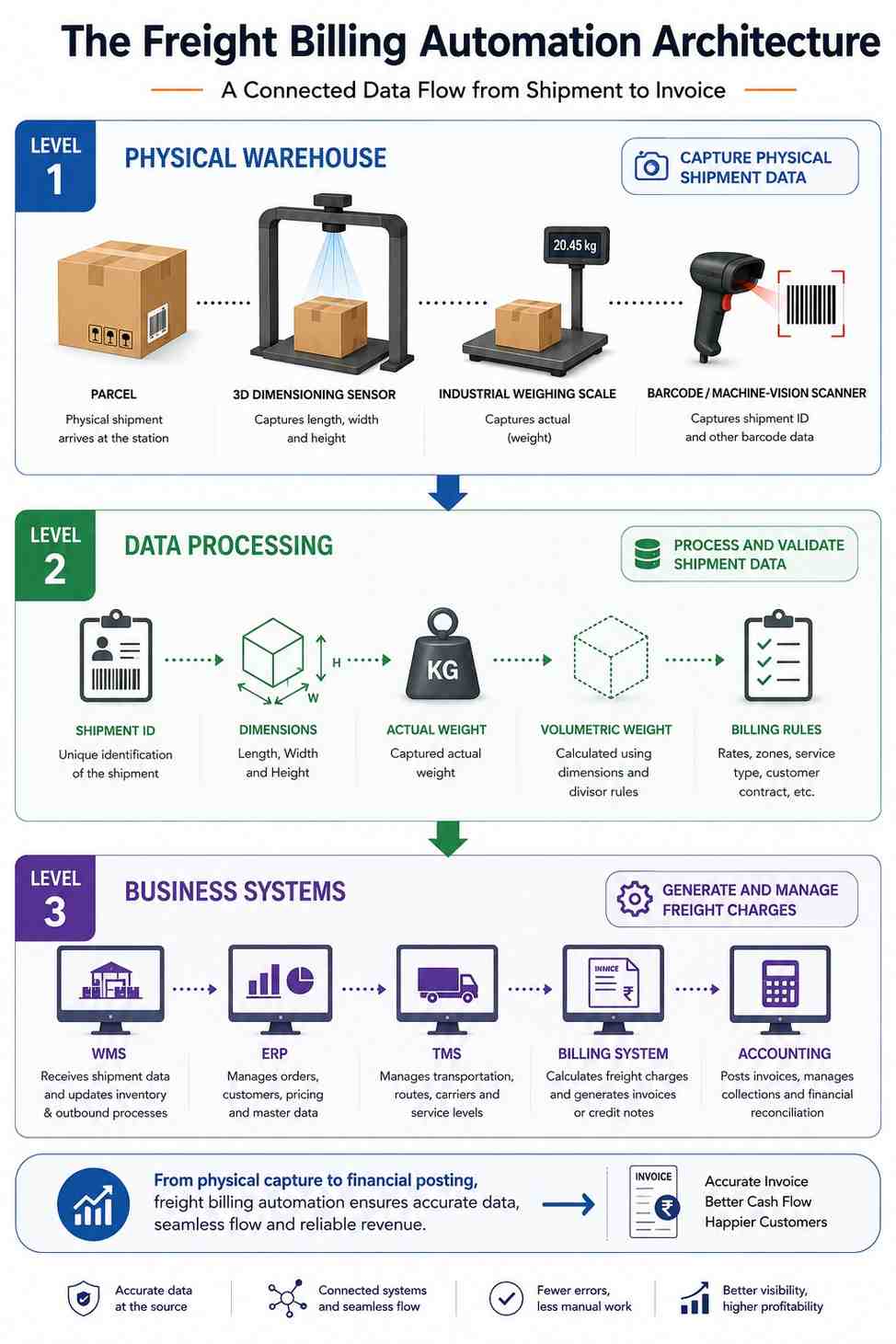
How Automated Data Capture Reduces Manual Entry
Manual data entry creates a gap between the physical event and the digital record.
A shipment may be physically measured at one point but digitally updated later.
That delay creates opportunities for:
- Transcription errors
- Incorrect shipment association
- Missing records
- Duplicate entries
- Delayed billing
An automated DWS workflow can reduce the number of manual steps by capturing shipment information directly at the measurement point.
The basic principle is simple:
Capture the data once, associate it with the correct shipment, and make it available to the systems that need it.
This does not mean that every warehouse process becomes fully autonomous.
Human operators may still place parcels, manage exceptions, verify unusual shipments, or handle operational decisions.
The automation is focused on removing repetitive data capture and transfer where machines can perform those tasks more consistently.
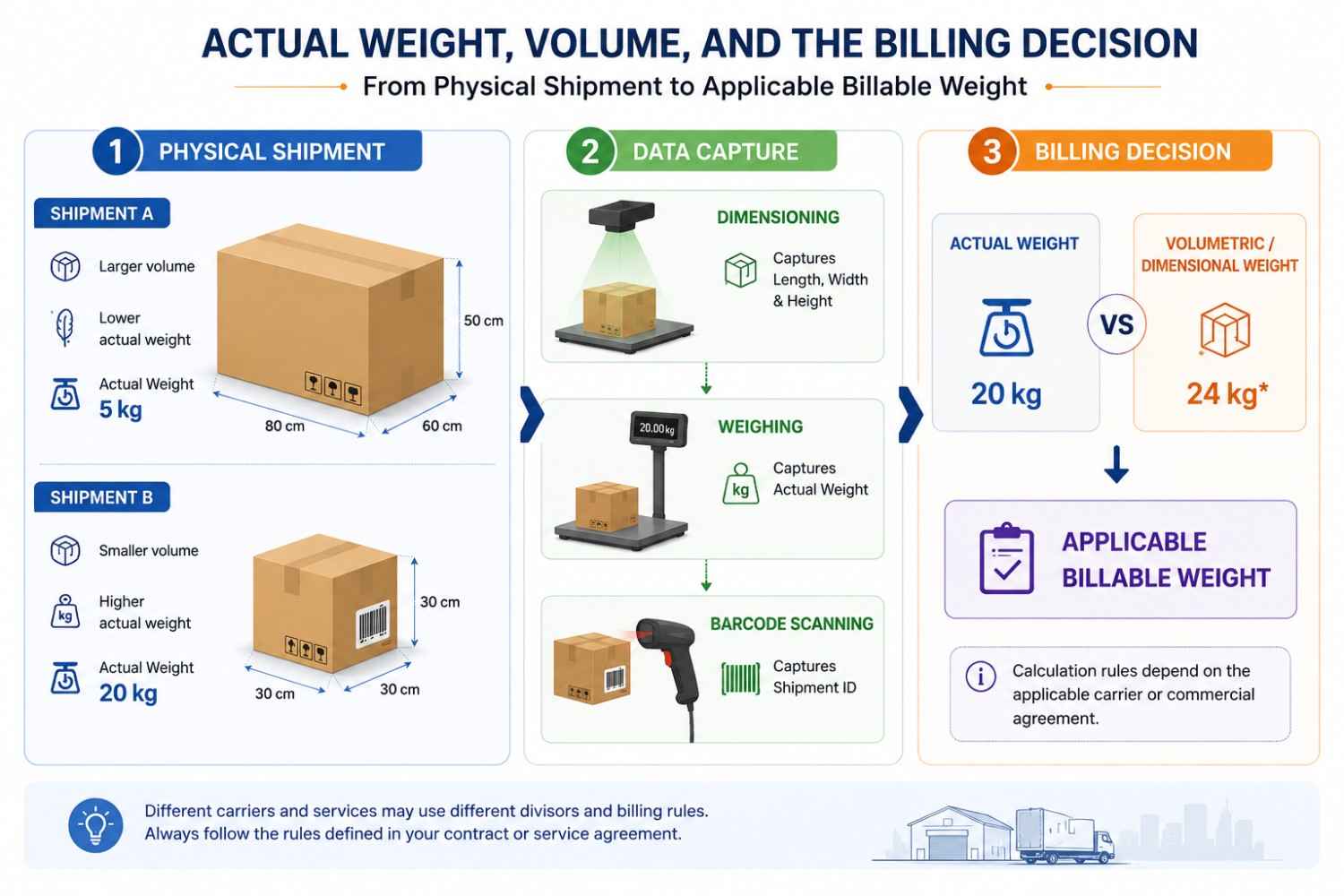
Why Volumetric Weight Matters to Freight Billing
Weight is only one part of a shipment’s physical profile.
A lightweight parcel can occupy significant transport space, while a heavy compact parcel may occupy relatively little.
For this reason, freight pricing models may consider dimensional or volumetric weight alongside actual weight, depending on the applicable carrier rules, service, and commercial agreement.
This creates an important requirement for warehouse operations.
If the billing process depends on dimensions, those dimensions need to be captured accurately.
A freight billing system can apply a calculation correctly, but it cannot correct inaccurate dimensions that were entered into the system earlier.
That is why volumetric weight billing system capabilities often depend on the quality of the physical data-capture process.
Difference Between Automating Billing and Automating the Billing Process
Manual Process vs Automated Freight Billing Workflow
Manual Workflow | Automated Workflow |
The operator measures shipment. | The system captures shipment dimensions. |
Weight is recorded separately. | Integrated weighing captures actual weight. |
Shipment information may be entered manually. | Scanner identifies the shipment. |
Data may be transferred between systems. | Data can flow through configured integrations. |
The billing team reconciles information. | Billing logic can use captured shipment data. |
Errors are often found after invoicing. | Exceptions can be identified earlier in the workflow. |
When Should a Warehouse Consider Freight Billing Automation?
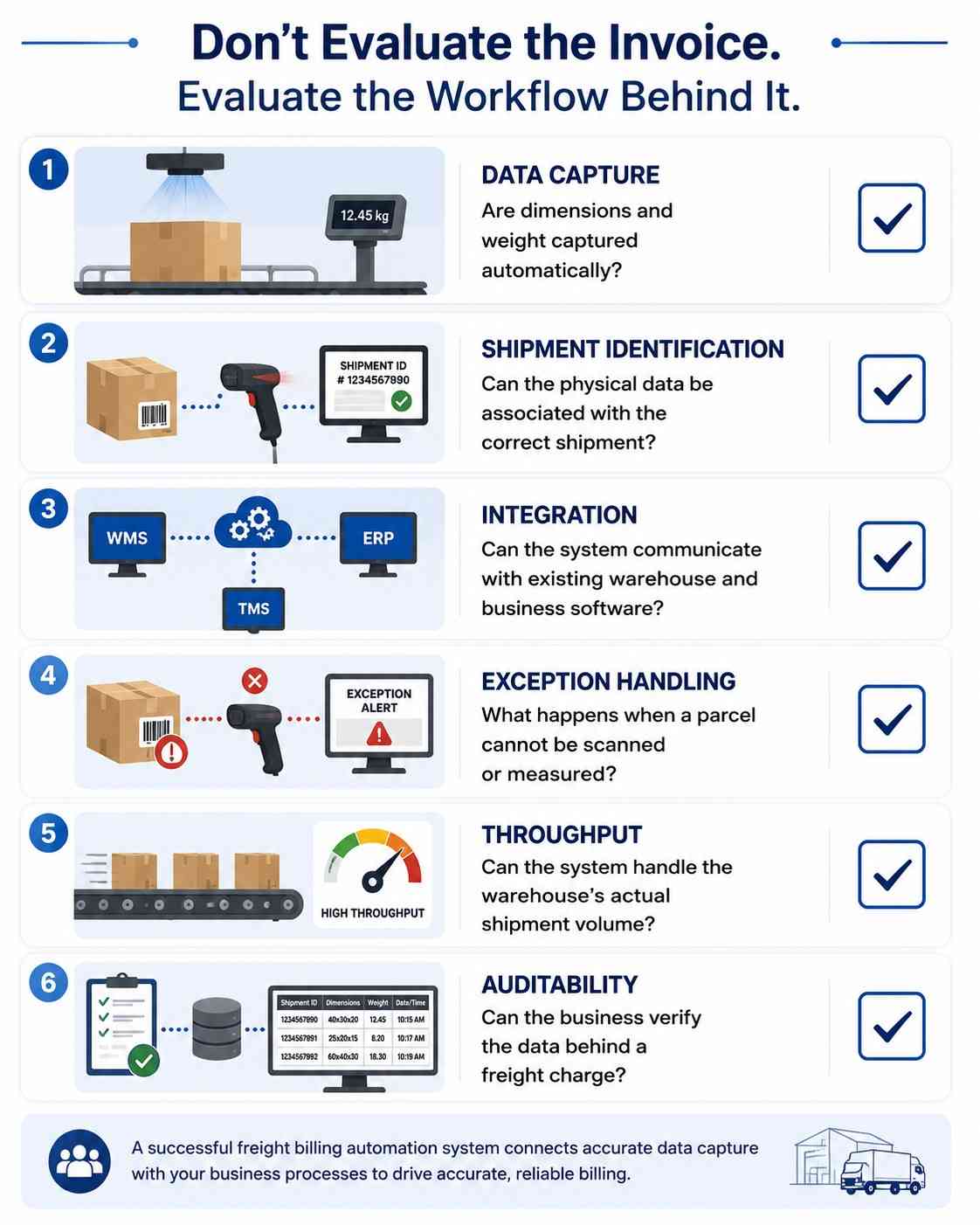
Warehouse and logistics managers should evaluate the complete workflow rather than selecting a system based on one feature.
1. Start With the Data Source
Ask where the billing information currently comes from.
If dimensions and weight are manually entered, that may be the first process that needs attention.
2. Examine Shipment Identification
Accurate measurements are not enough if they cannot be associated with the correct shipment.
The system should have a clear method for linking physical data to the relevant shipment record.
3. Review Integration Requirement
Identify the systems that need to receive the data.
This may include:
- WMS
- ERP
- TMS
- Billing software
- Accounting platforms
The integration should be evaluated based on the actual workflow rather than a generic claim of compatibility.
4. Define Exception Handling
No automated system operates without exceptions.
The solution should define what happens when:
- A barcode cannot be read.
- A parcel is outside the measurement range.
- A shipment is damaged.
- Dimensions appear inconsistent.
- The system cannot match a shipment to a record.
5. Consider Throughput
A system designed for a low-volume measurement station may not be suitable for a high-speed conveyor environment.
The required throughput should be matched to the actual operation.
Quinta positions its Dynamic DWS solution for continuous in-motion capture and high-volume logistics workflows, with the product page stating throughput of up to 1,500 parcels per hour for the described deployment.
That figure should be evaluated against the specific system configuration and operating conditions rather than treated as a universal performance guarantee.
6. Check the Audit Trail
When billing disputes occur, the business needs to understand what information was used to calculate the charge.
The availability of measurement records, shipment identifiers, timestamps, images, or other evidence depends on the system architecture and should be verified during evaluation.
Frequently Asked Questions
What is DWS system integration?
How does DWS integrate with WMS?
How does DWS integrate with ERP?
What causes latency in DWS integration?
How can DWS integration latency be reduced?
What happens when a DWS barcode cannot be read?
Can DWS integrate with automated sorters?
References
GS1 – Logistic Label Guideline
Guidance on identifying, tracking and tracing logistics units using standardized labels and shipment identifiers.
https://www.gs1.org/standards/gs1-logistic-label-guideline/1-3
NIST – Measurement Standards
Background on measurement standards and the importance of reliable measurement.
https://www.nist.gov/feature-stories/why-you-need-standards/measurement-standards
DHL – Logistics Trend Radar 8.0
Industry insights into logistics technology, automation, efficiency and emerging supply-chain trends.
https://www.dhl.com/us-en/home/innovation-in-logistics/logistics-trend-radar.html
MHI – Industry Reports
Research and industry insights into supply-chain trends, material handling and automation.
https://www.mhi.org/publications
McKinsey – Supply Chain and Operations Insights
Analysis of supply-chain transformation, digital operations and automation.
https://www.mckinsey.com/capabilities/operations/our-insights
About Author
Stephen Athokpam is a Warehouse Automation Specialist at Quinta, covering high-speed sortation systems, material handling tech, and distribution center optimization.

